VHDL-Based Implementation of Chrome Dino Game

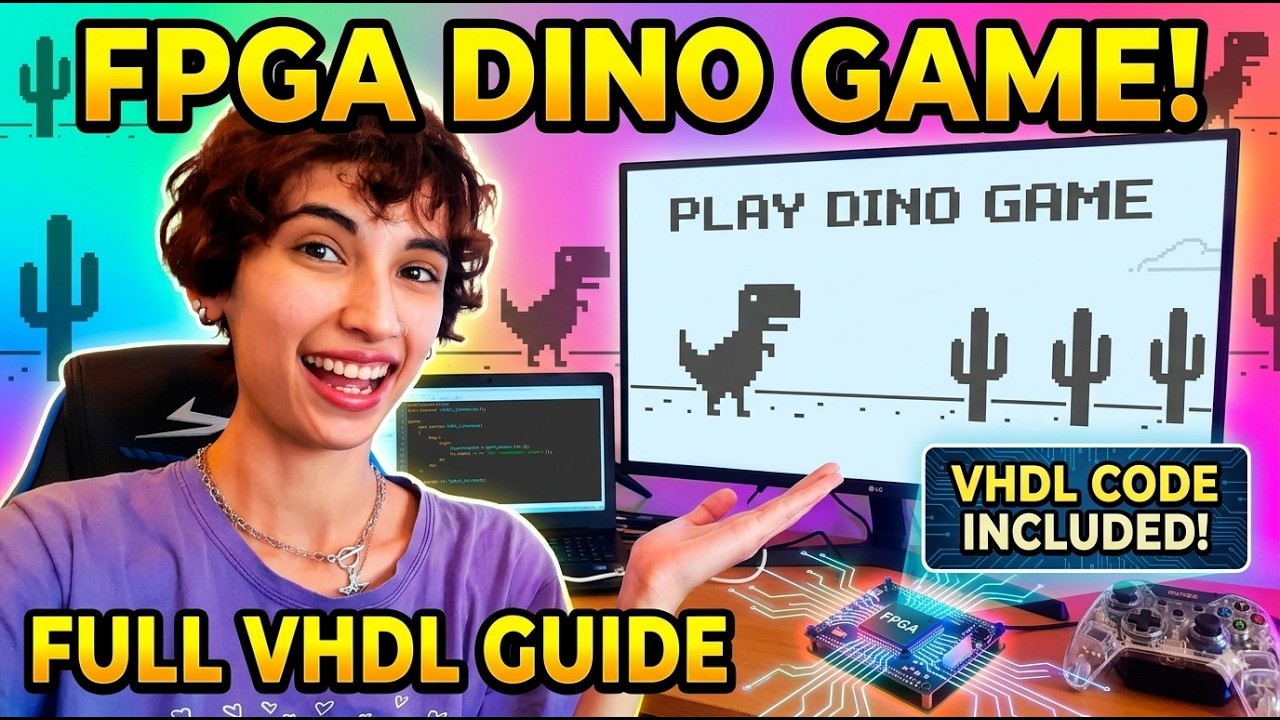
Welcome to the Chrome Dino Game repository! This repo contains a complete reconstruction of the famous “Chrome Dino” game, designed to run on the Cyclone V GX FPGA using pure VHDL. Let’s have a quick Demo of the Game in video below.
Watch my video on youtube (click on the picture below):
Why do I Build games?
In the spring of 2026, I decided that I wanted to truly master RTL design, and I asked myself: what could be more joyful than building games in hardware?=)))
That idea became the start of my FPGA game‑development adventure. The Dino Game was my third serious milestone (and honestly, my favorite one), and through it I practiced real RTL design, timing, video output, and hardware‑driven game logic.
Project Overview
The goal of this project is to implement the Chrome Dino game On FPGA. The game allows a player to control a dinosaur, jumping or crawling to avoid obstacles like cactuses and bats. As the game progresses, the player’s score is displayed on the board’s seven-segment displays.
System Architecture
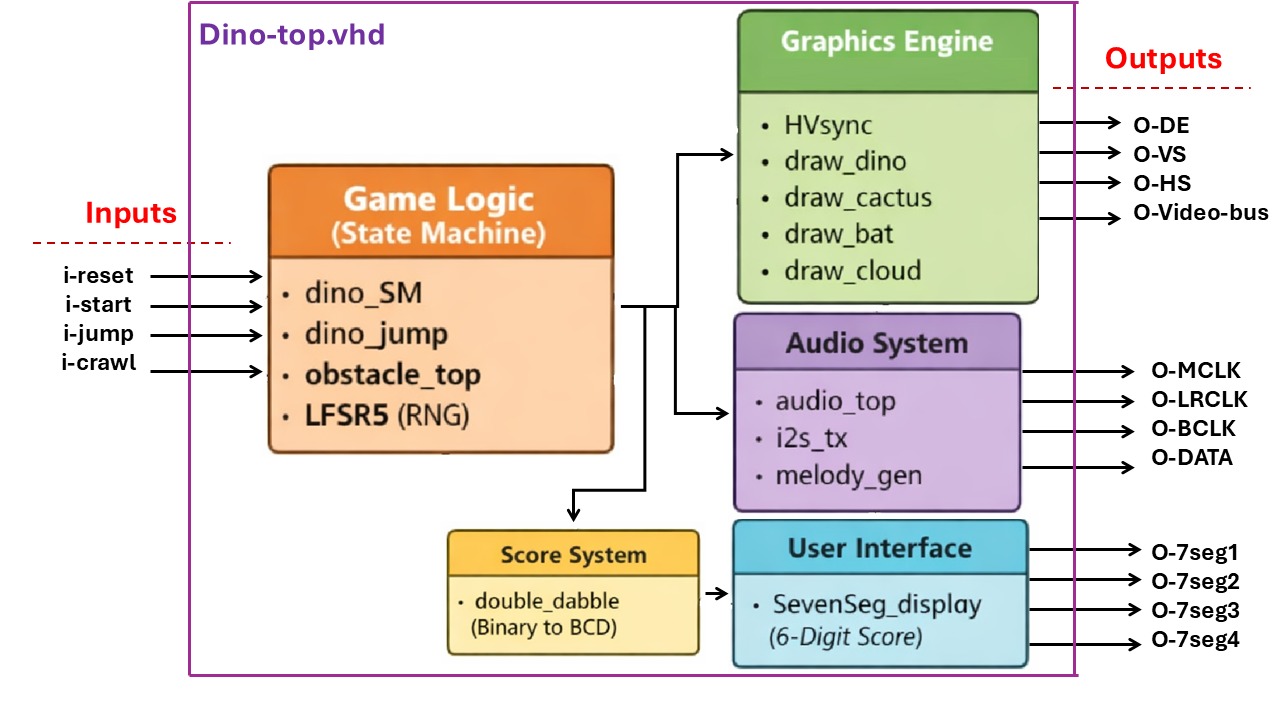
The architecture is modular. At the center is the Top-Level Module (top/dino_top), which connects the inputs (buttons) to the logic and outputs (HDMI and Audio).
The Dino Game’s Block Diagram:
State Machine(FSM):
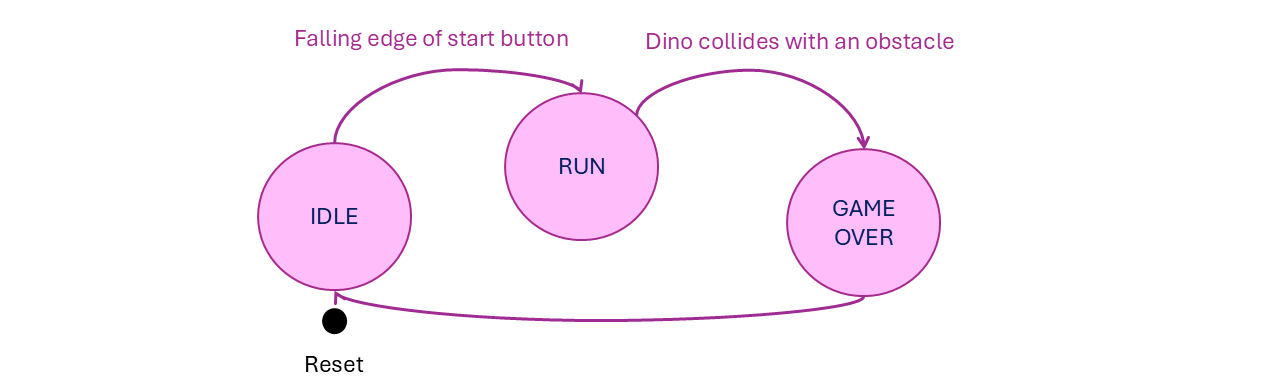
The logic/dino_SM.vhd module acts as the central controller for the game, utilizing a synchronous finite state machine to manage three distinct operational states.
States of the State Machine
IDLE: This is the default starting state where the system waits for the user to press thei_startbutton to begin the game.RUN: In this state, the game is active. The module enables the dinosaur’s movement and animation frames while monitoring user inputs for jumping (i_jump_button_L) and crawling (i_crawl_button_L).GAME_OVER: This state is triggered when a collision is detected, effectively halting the game logic and enabling the “dead” animation frame for the dinosaur.
The state machine’s main job is to coordinate the behavior of other modules by toggling specific enable signals. It outputs control signals such as o_run_en, o_jump_en, and o_crawl_en to determine which visual frame of the dinosaur should be drawn on the screen and whether obstacles should continue moving. Additionally, it manages the o_reset_game signal to clear scores and positions between game sessions.
Detailed Module Explanation
Core Game Logic
top/dino_top: This is the “brain” of the project. It integrates all sub-modules.logic/dino_SM: The State Machine that controls the game’s current status. it transitions betweenIDLE(waiting to start),RUN(active gameplay), andGAME_OVER.logic/dino_jump: This module manages the vertical position of the Dino. It uses gravity and velocity logic to make the jump look smooth.logic/obstacle_top: This manages the spawning and behavior of obstacles. It determines which obstacle appears next and tracks the player’s score.logic/object_movement: A generic module used to move objects (like clouds or cactuses) from the right side of the screen to the left at a specific speed.logic/make_alive: This module acts as an animation controller. It toggles between different “frames” to make the Dino and bats appear to be moving.
Graphics and Display
graphics/HVsync: Generates the Horizontal and Vertical synchronization signals required for HDMI monitors to display a stable image.graphics/draw_dino,graphics/draw_cactus,graphics/draw_bat,graphics/draw_cloud: These are specialized drawing engines. Each one checks the current pixel coordinate (X, Y) and determines if a specific part of a character or obstacle should be colored.graphics/draw_start&graphics/draw_gameOver: These modules handle the text overlays for the opening screen and the end-game screen.
Audio System
audio/audio_top: The top-level controller for the audio system. It receives triggers from the game logic to play specific sounds.audio/i2s_tx: This module transmits digital audio data to the FPGA’s onboard audio codec using the I2S (Inter-IC Sound) protocol.audio/melody_gen: Generates the actual square-wave frequencies for different sound effects, such as the “jump” beep or the “dead” tone.
Utilities and UI
utility/debounce_filter: This is essential for hardware buttons. It filters out electrical noise (“bouncing”) so that one button press is only counted once.utility/LFSR5: A Linear Feedback Shift Register used to generate pseudo-random numbers, ensuring that obstacles appear at random intervals.utility/double_dabble: Converts the binary score into BCD (Binary Coded Decimal) so it can be easily displayed on seven segment display.utility/sevenSeg_display: Takes the BCD score and converts it into the patterns needed to light up the seven-segment displays on the board.pkg/dino_pack: A package file that stores global constants (like screen height and width) and shared functions used across all modules.
Setup Guide
The project is tested on Altera Cyclone V GX Starter Kit.
For the Cyclone V GX FPGA Board, I have used the follwing Pinout table:
Click here to open the Pinout-Table.CSV
How to Play:
- Press the Start button to begin.
- Use the Jump button to clear cacti and low-flying bats.
- Use the Crawl button to duck under high-flying bats.
- Watch your score increase on the Seven-Segment Display!