Implementing an Audio Engine on FPGA

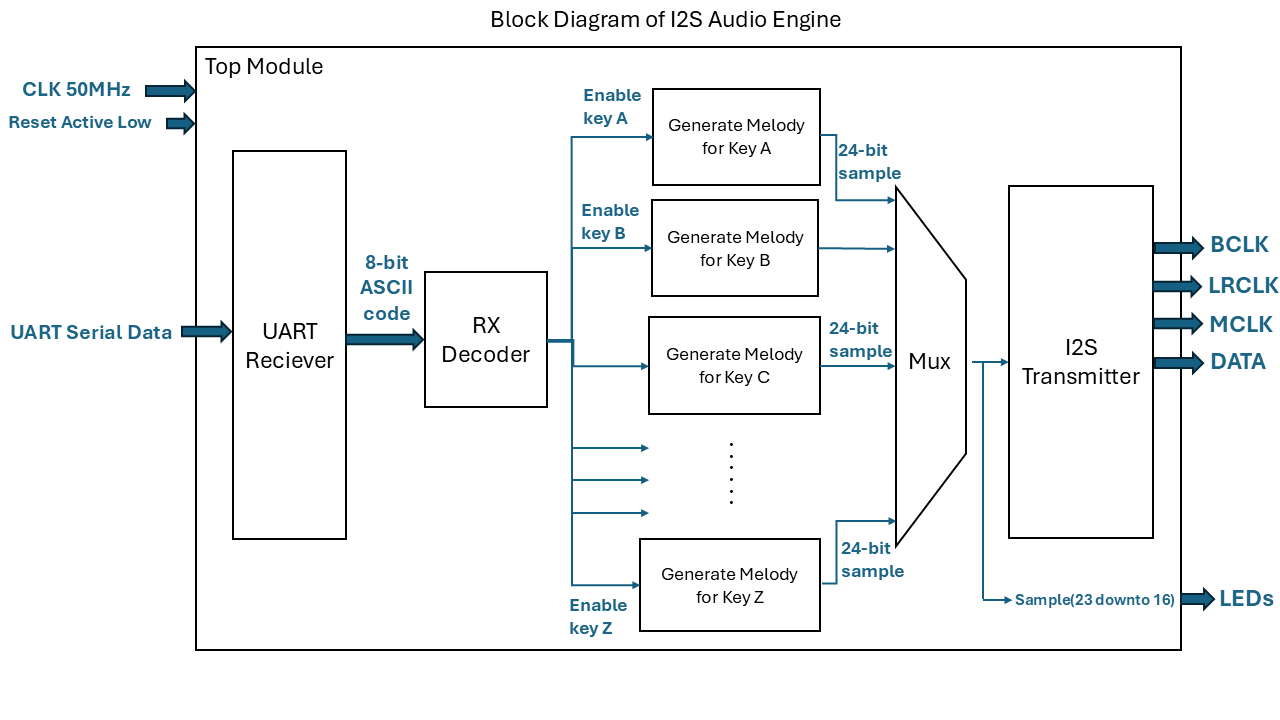
This repo contains a digital system that reads serial data and turns it into audio signals. The UART receiver and decoder modules take incoming ASCII characters and map them to specific musical notes. A melody generator and a package file then work together to create digital audio samples from these notes. These samples are sent out through an I2S transmitter, which handles the timing clocks and serial data needed for audio hardware. The repo also includes testbenches for the I2S transmitter and UART receiver to check that both protocols work correctly.
Watch my video on youtube (click on the picture below):
Project Overview
The goal of this project is to create an interactive musical system. When you send ASCII characters (standard text) through a serial connection, the system identifies the character and maps it to a specific musical note. These notes are then synthesized into digital audio samples and transmitted using the I2S protocol. This project covers the full path of data: from receiving raw serial bits to producing high-quality 24-bit audio signals.
Generated Audios
Below, you can listen to all the generated audio samples for each keyboard key. Alos you can find the corresponding frequency and duration details for these melodies in my custom melody_pack.vhd package.
Generated Audio for Key A: Evolving and Machine Awakening.
Click to play the audio!
Generated Audio for Key B: Mega Police Siren (Up-Down Sweep Loop).
Click to play the audio!
Generated Audio for Key C: Realistic Police Sweep.
Click to play the audio!
Generated Audio for Key D: Ambulance Siren (Hi-Lo).
Click to play the audio!
Generated Audio for Key E: Pursuit Mode Siren.
Click to play the audio!
Generated Audio for Key F: Barbie Magic Sparkle.
Click to play the audio!
Generated Audio for Key G: Barbie Hello Startup.
Click to play the audio!
Generated Audio for Key H: Barbie Keypad Beeps.
Click to play the audio!
Generated Audio for Key I: Barbie Fairy Wand.
Click to play the audio!
Generated Audio for Key J: Barbie Toy Ringtone.
Click to play the audio!
Generated Audio for Key K: Retro Start Game.
Click to play the audio!
Generated Audio for Key L: Retro Stage Select.
Click to play the audio!
Generated Audio for Key M: Retro Adventure Theme.
Click to play the audio!
Generated Audio for Key N: Retro Racing Loop.
Click to play the audio!
Generated Audio for Key O: Retro Dungeon Theme.
Click to play the audio!
Generated Audio for Key P: Retro Boss Warning.
Click to play the audio!
Generated Audio for Key Q: Bird Chirp.
Click to play the audio!
Generated Audio for Key R: Frog Croak.
Click to play the audio!
Generated Audio for Key S: Elephant Call.
Click to play the audio!
Generated Audio for Key T: Steam Engine.
Click to play the audio!
Generated Audio for Key U: Alien Siren.
Click to play the audio!
Generated Audio for Key V: Robot Talking.
Click to play the audio!
Generated Audio for Key W: Spaceship Engine Hum.
Click to play the audio!
Generated Audio for Key X: Evolving: Rising Dawn.
Click to play the audio!
Generated Audio for Key Y: Evolving: Cosmic Scanner.
Click to play the audio!
Generated Audio for Key Z: Evolving: Danger Rising.
Click to play the audio!
Module Descriptions
UART_RX (Universal Asynchronous Receiver)
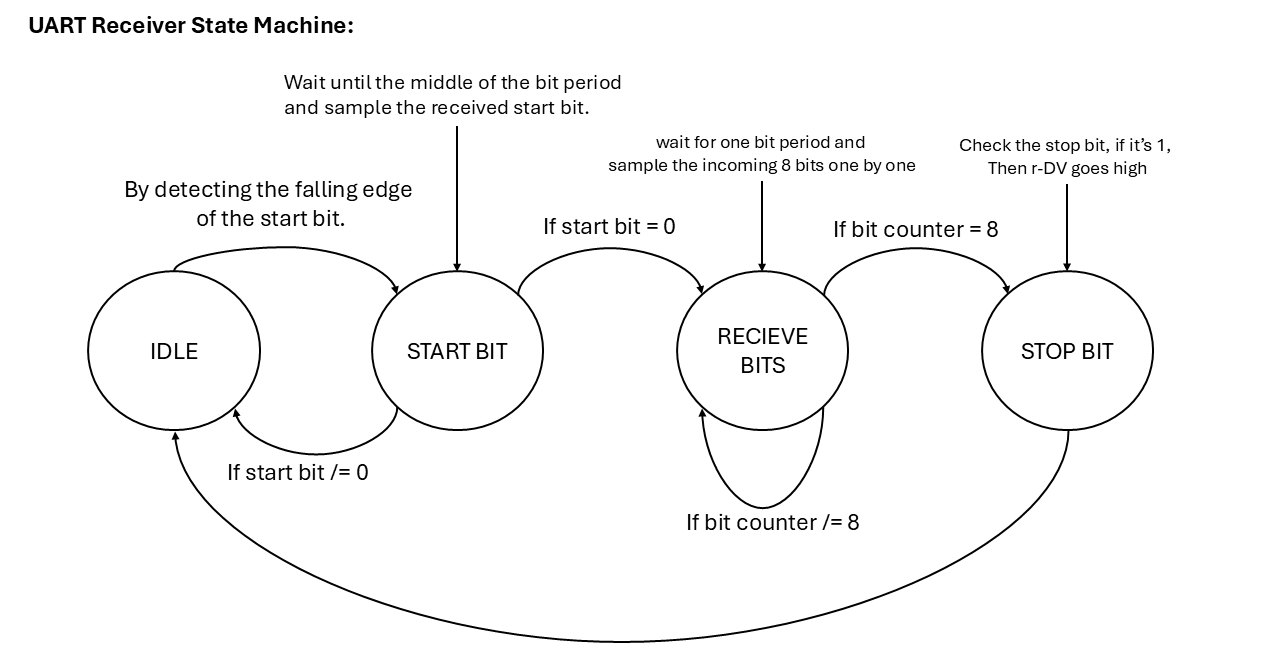
This is the entry point of the system. It receives 8 bits of serial data, one start bit, and one stop bit. It uses a generic called g_CLKS_PER_BIT to match the FPGA’s internal clock (50MHz) to the desired baud rate (e.g., 115200). Once a complete character is received, it triggers a “Data Valid” signal (o_data_DV) to let the rest of the system know a new character is ready.
RX_decoder
This module acts as a translator. It takes the 8-bit ASCII code from the UART receiver and maps it to 26 different output ports (o_key_a through o_key_z). This allows the system to recognize which letter was typed and trigger the corresponding musical response.
melody_pack
This is my custom package that provides a specialized data type called t_tone_array. This array allows the system to store a flexible list of tone frequencies, making it easier to manage the “library” of sounds the engine can produce.
melody_gen (Melody Generator)
This is the heart of the sound production. It generates audio samples (24-bit resolution) by toggling between positive and negative amplitudes (AMP_POS and AMP_NEG) to create a digital wave. It uses the LRCLK (Left-Right Clock) as a reference to ensure the notes are played at the correct frequency and for the correct duration.
i2s_tx (I2S Transmitter)
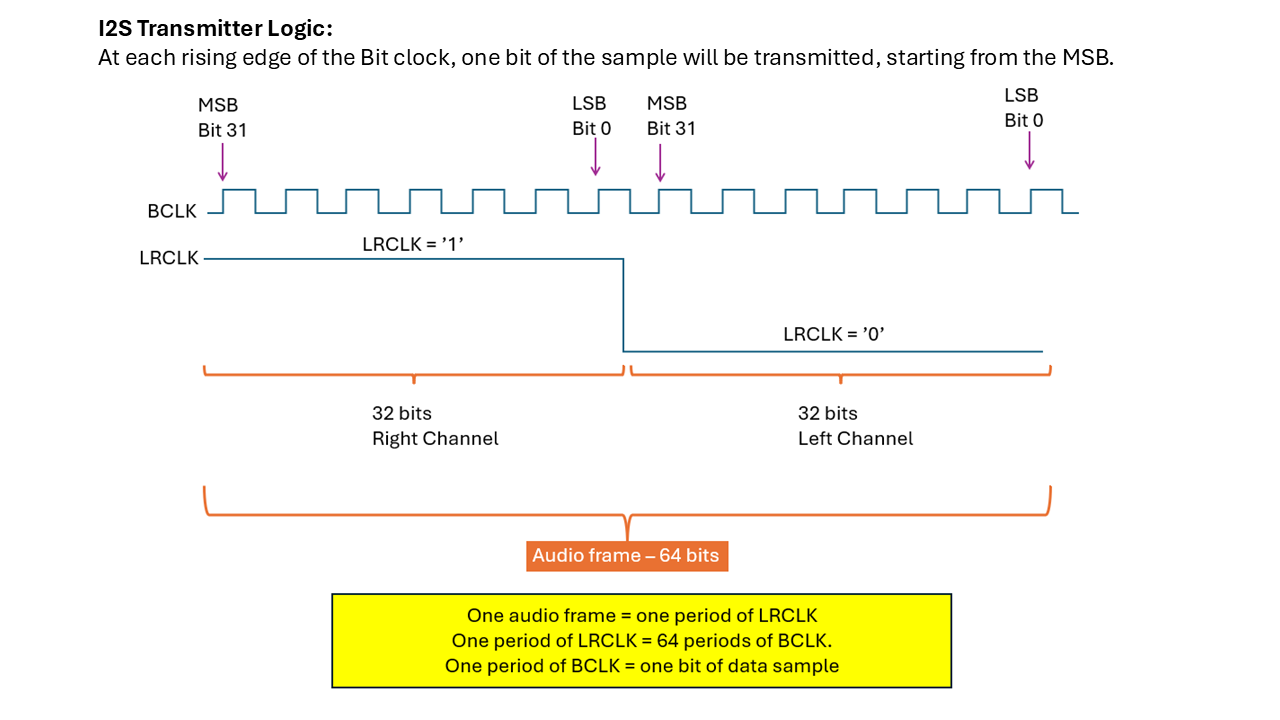
To hear the sound, the digital samples must be sent to an audio codec. This module generates three critical clocks:
- MCLK (Master Clock): 12.5 MHz for the hardware’s internal timing.
- BCLK (Bit Clock): 3.125 MHz to time each individual bit of data.
- LRCLK (Left-Right Clock): 48.828 kHz, which determines the audio sample rate. It serializes the 32-bit samples into a continuous stream of data for the audio hardware.
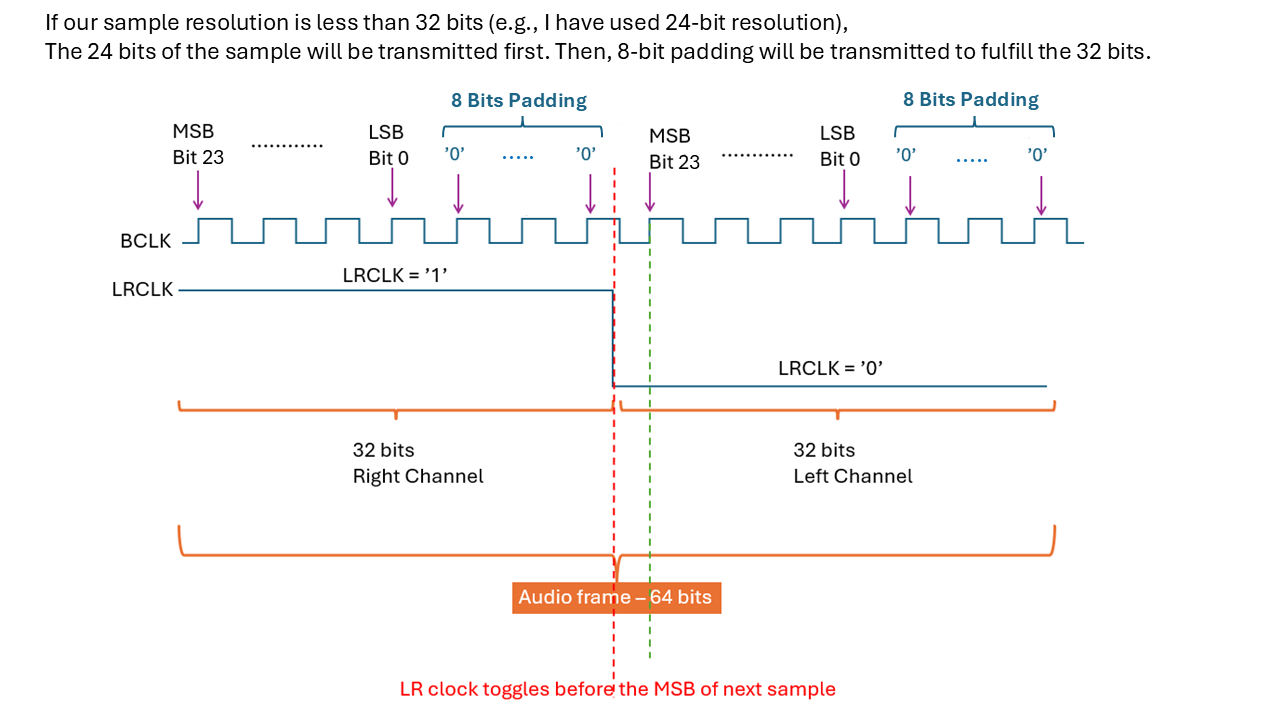
audio_engine_top
This is the top-level entity that connects all the modules mentioned above. It handles the 50MHz system clock, the reset logic, and routes the signals between the UART, the decoder, the generator, and the transmitter.
Setup Guide
Verification:
You can use the provided testbenches (UART_RX_TB and i2s_tx_TB) in your desired simulator(I have used Isim to write and simulate them) before loading the design onto the hardware to verify that the timing and data streams are correct.
Serial Settings:
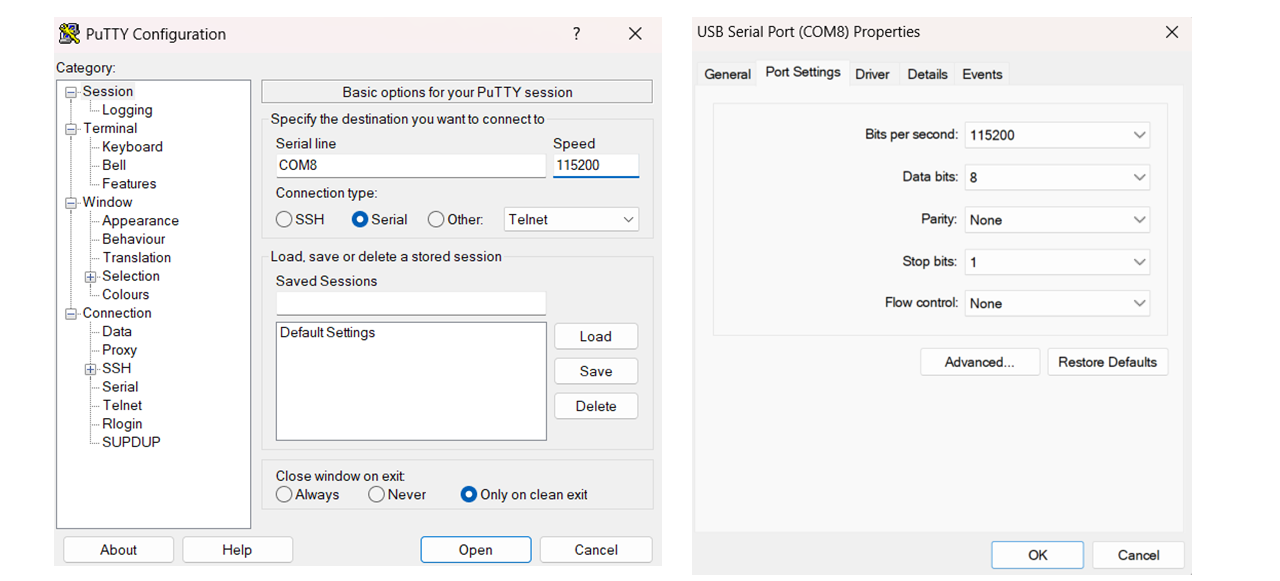
Configure your PC’s serial terminal (I used PuTTY) to match the g_CLKS_PER_BIT setting in the UART_RX module (typically 115200 baud).
Hardware Deployment:
This audio engine has been tested on the Cyclone V GX FPGA, to see the pinout table click on link below:
Click here to open the Pinout-Table.CSV