Implementing Space Invaders Game on Hardware

Welcome to the Space Invaders Game repository! This repository contains a complete implementation of the classic arcade “space invaders” game. Let’s have a quick Demo of the Game in video below. I really recommend you to watch the video, it’s too much FUN.=)))))
Watch my video on youtube (click on the picture below):
Why do I Build games?
In the spring of 2026, I decided that I wanted to truly master RTL design, and I asked myself: what could be more joyful than building games in hardware?=)))
That question started my whole FPGA game‑development journey. Space Invaders became my fourth serious milestone, and probably my last gaming project for a while. As I’m writing this README, I can feel myself moving toward new challenges. Recently, I’ve been thinking about trying image and video‑processing projects on FPGA. I feel like I’ve done enough game projects, and now I want to explore something more advanced and closer to real industrial work. but who knows, I’ll see where the journey goes.
Through the space invaders game, I practiced real RTL design, timing, video output, and hardware‑driven game logic. This project is the point where my learning turned into something creative, fun, and fully my own.
Project Overview
The goal of this project is to recreate the retro Space Invaders experience on hardware. It features a player-controlled “Space Sheep” (my version of spaceship), waves of moving invaders, a mysterious UFO, and a projectile system for both the player and the enemies. The game manages different states, such as the start screen, active gameplay, losing lives, and the “Game Over” or “Win” conditions. Everything is synchronized to a 640x480 VGA timing at 60Hz(which will be displayed on monitor using HDMI port) and includes I2S-based audio for sound effects and music. The game uses UART-RX interface and player can communicate with game using a keyboard which is connected to a PC.
A fun thing to add here: when I started writing this game, I began with the spaceship logic. At the moment I was writing the spaceship module, I couldn’t remember the exact spelling of the word “spaceship”. I wasn’t sure if it was “spacesheep” or “spaceship”, so I just wrote “spacesheep” and continued with it.
When I reached the end of the project, I realized, “oh no! I chose the wrong spelling”, but it was too late. So I decided to keep it as “spacesheep”. Whenever you see “spacesheep” in the code, it actually means “spaceship”. I kept it as a funny part of this project, since it doesn’t affect the game logic at all.
By the way, I’m pretty sure that if my high‑school English teacher read this, she wouldn’t be very happy with me. hahaha =)))
System Architecture
The architecture follows a hierarchical structure where a Top-Level Module (top/space_invaders_top) connects various sub-systems:
The Space Invaders Game’s Block Diagram:
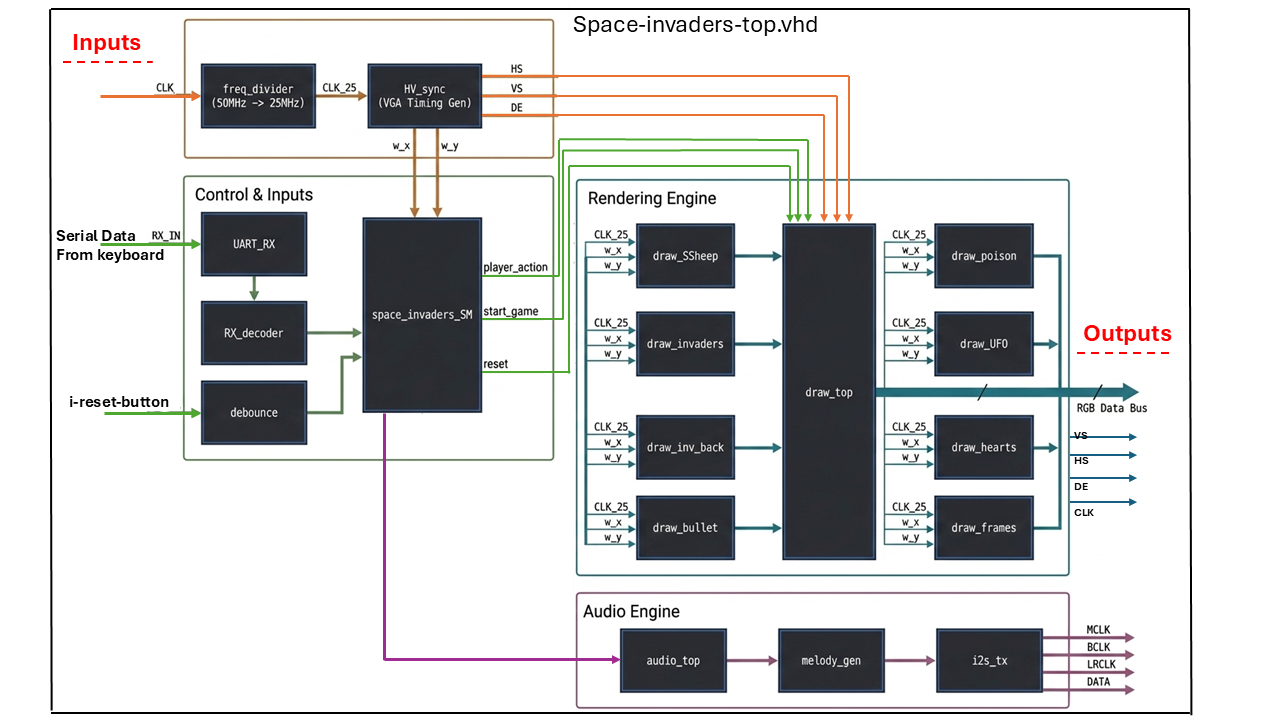
- Input System, UART-RX: Captures keyboard commands via UART-Reciver and send the recieved 8-bit ASCII code to RX-decoder in order to comminicate with game.
- Game Logic (The Brain): A central State Machine (SM) tracks the game status and coordinates movement and collisions.
- Movement Modules: Dedicated blocks calculate the X and Y coordinates for every moving object on the screen.
- Graphics Engine: A drawing pipeline that checks current pixel coordinates and decides what color to display.
- Audio Controller: A sound system that generates melodies and sound effects based on game events.
State Machine(FSM):
The logic/space_invaders_SM module serves as the central “brain” of the project, utilizing a Finite State Machine (FSM) to manage the game’s lifecycle through five primary states:
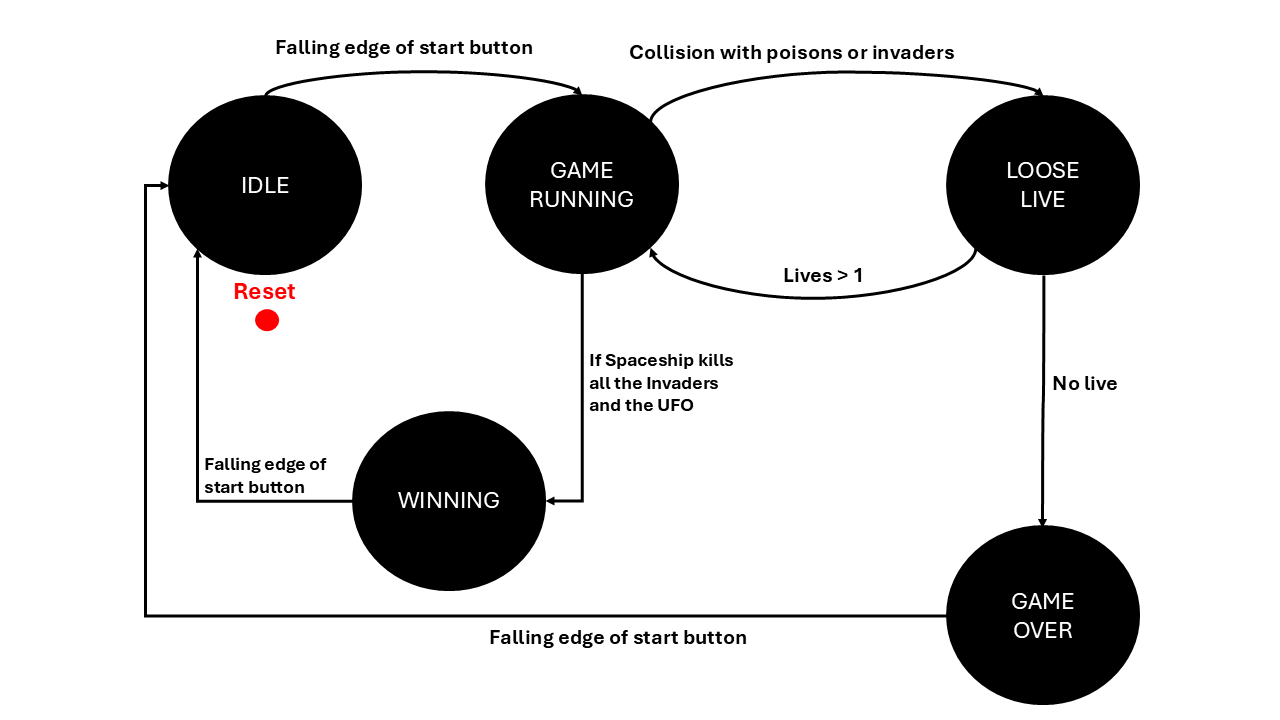
- IDLE: The default starting state. It displays the “Start” frame and waits for the player to press the start button (
i_start) to begin the game. - GAME_RUNNING: The active gameplay state. It enables all movement modules (player ship, invaders, bullets, and poison) and monitors for collisions and progress.
- LOOSE_LIVE: Triggered when a player is hit by an enemy projectile or an invader reaches the bottom. This state handles the logic for reducing the player’s life count before returning to gameplay or ending the game.
- WINNING: Entered if the player successfully destroys all waves of invaders + UFO, triggering the “Win” screen display.
- GAME_OVER: Entered when the player’s lives reach zero, triggering the “Game Over” screen.
The module controls the behavior of other system components by outputting specific enable signals (such as o_run_en or o_start_en) and tracking game data like entity positions and remaining lives.
Module Explanations
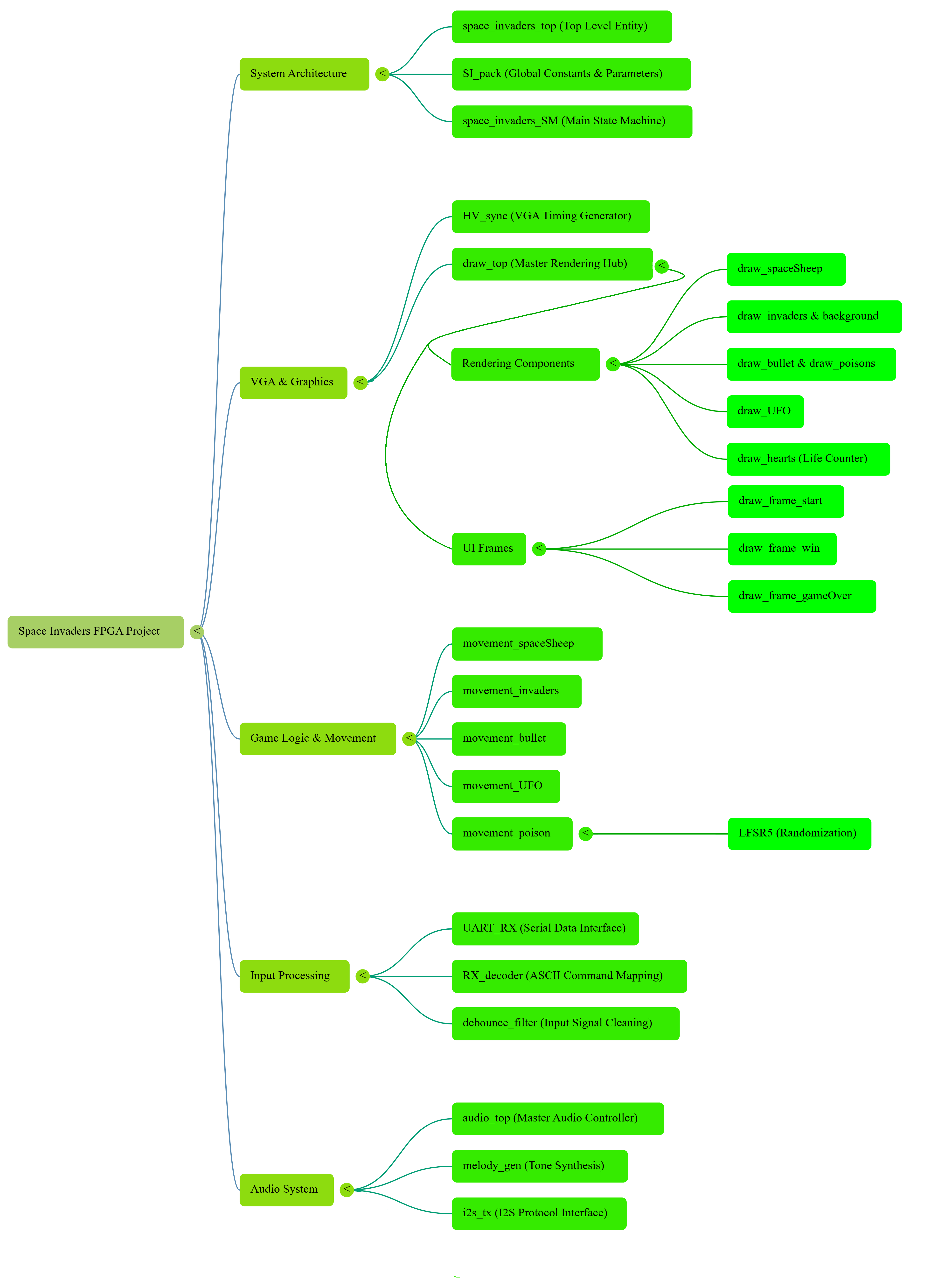
Let’have a look at Space Invaders Game’s flow chart and explore the functionality of each module in detail.
Core Game Logic & Control
top/space_invaders_top: The main container that connects all components together, managing the clock signals and data flow between the logic and the hardware pins.logic/space_invaders_SM: This is the Finite State Machine. It manages the flow of the game through states likeIDLE,GAME_RUNNING,LOOSE_LIVE,WINNING, andGAME_OVER.pkg/SI_pack: A package file containing all the essential constants, such as VGA timing parameters and game-wide settings.
Movement & Mechanics
logic/movement_spaceSheep&logic/movement_invaders: These modules update the positions of the player and the enemies. The invaders move horizontally and drop down when they hit the screen borders.logic/movement_bullet&logic/movement_poison: These handle the physics of projectiles. The “bullet” is fired by the player, while “poison” is dropped randomly by invaders.logic/movement_UFO: Manages the horizontal path of the special UFO enemy.utility/LFSR5: A Linear Feedback Shift Register used to generate pseudo-random numbers, ensuring the invaders’ attacks are unpredictable.
Graphics & Display
graphics/HV_sync: Generates the Horizontal and Vertical sync signals required for a standard HDMI monitor to display the 640x480 image.graphics/draw_top: The “master artist” module. It collects drawing signals from all sub-modules (invaders, bullets, hearts, etc.) and outputs the final 24-bit color data to the HDMI port.- Specific Draw Modules: Modules like
graphics/draw_invaders,graphics/draw_spaceSheep, andgraphics/draw_frame_gameOvercontain the pixel patterns (bitmaps) for each game object.
Input & Audio
peripherals/UART_RX&peripherals/RX_decoder: Allow the game to be controlled by a PC keyboard. It receives serial data and converts it into game commands (Move Left, Move Right, Fire).utility/debounce_filter: Ensures that physical button presses are clean and free of electrical noise(used for reset button).audio/audio_top&audio/i2s_tx: These modules communicate with the board’s audio codec using the I2S protocol to play sounds for firing, explosions, and background music.audio/melody_gen: Generates specific tones and durations to create the game’s music.
Setup Guide
Using UART to USB cable, connect your PC’s serial output(USB port) to the FPGA board. Then Open a terminal emulator like PuTTY or Tera Term. Select the “Serial” connection type and enter the following settings:
- Serial Line: [Your COM Port Number]
- Baud Rate (Speed): 115200
- Data Bits: 8
- Stop Bits: 1
- Parity: None
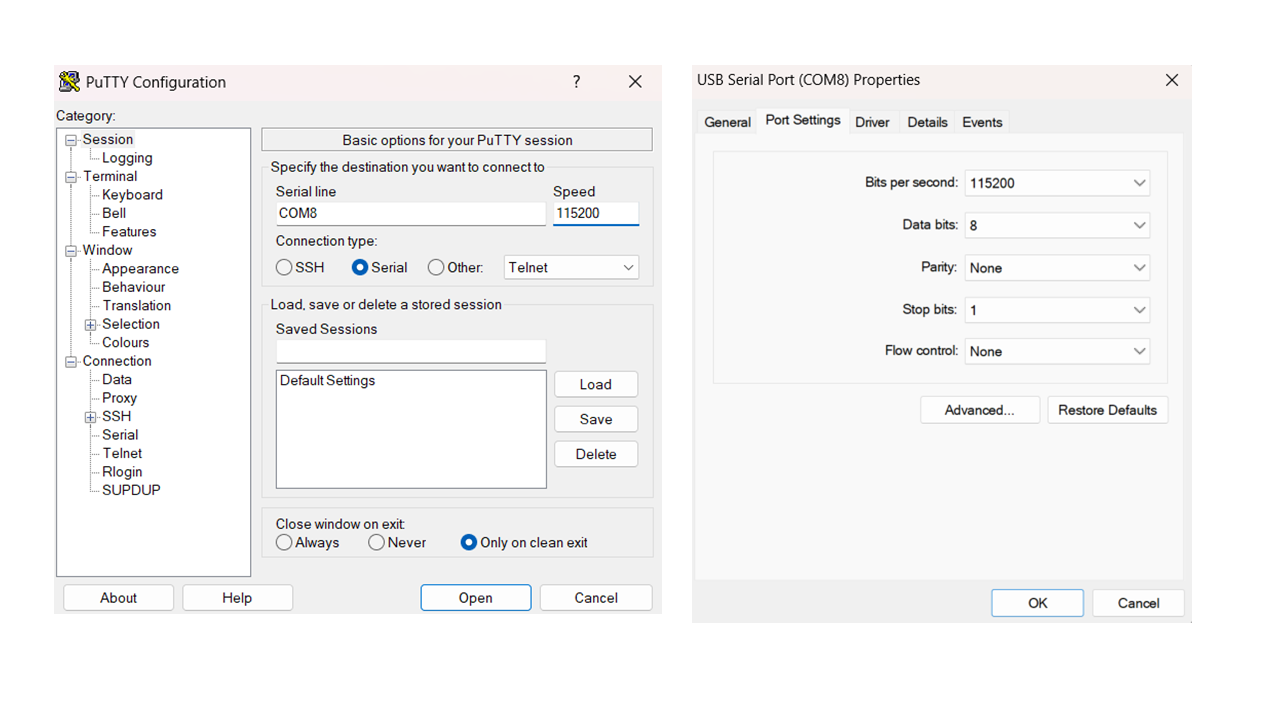
For the Cyclone V GX FPGA Board, I have used the follwing Pinout table:
Click here to open the Pinout-Table.CSV